Hybrid Automation
Hybrid automation lets you pause an automated script, hand control to a human via a secure live URL, and resume automation once they finish. Use it for login flows, 2FA, CAPTCHAs, or any step that requires human judgment.
Use the CDP reference for parameters, validation and event payloads, or Live URLs with BrowserQL and BAP for those clients' handoff lifecycle.
- A Browserless API token from your account dashboard
- Puppeteer or Playwright installed locally
The Live URL timeout sets how long the link stays valid. It doesn't keep the browser alive, so keep your connection open or call reconnect for keep-alive. The link is also capped at the session's remaining time and closes at the browser session's absolute maximum duration.
What the person sees
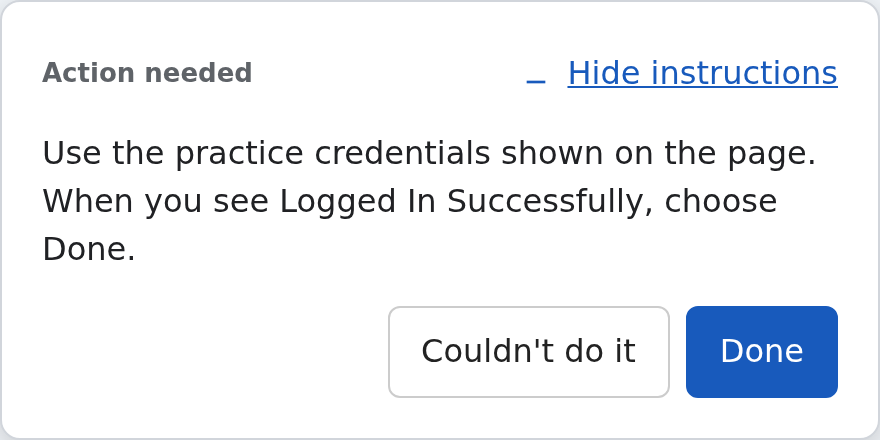
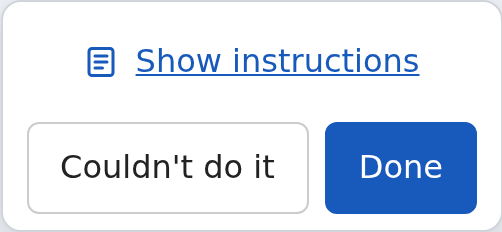
The task card appears only when you pass non-empty instructions. Done hands control back immediately; Couldn't do it (or Couldn't finish in panel layout) opens a feedback form before the person ends the handoff. Hiding instructions leaves Done reachable. Without instructions, no card or completion buttons appear.
These screenshots show the viewer with a sample task.
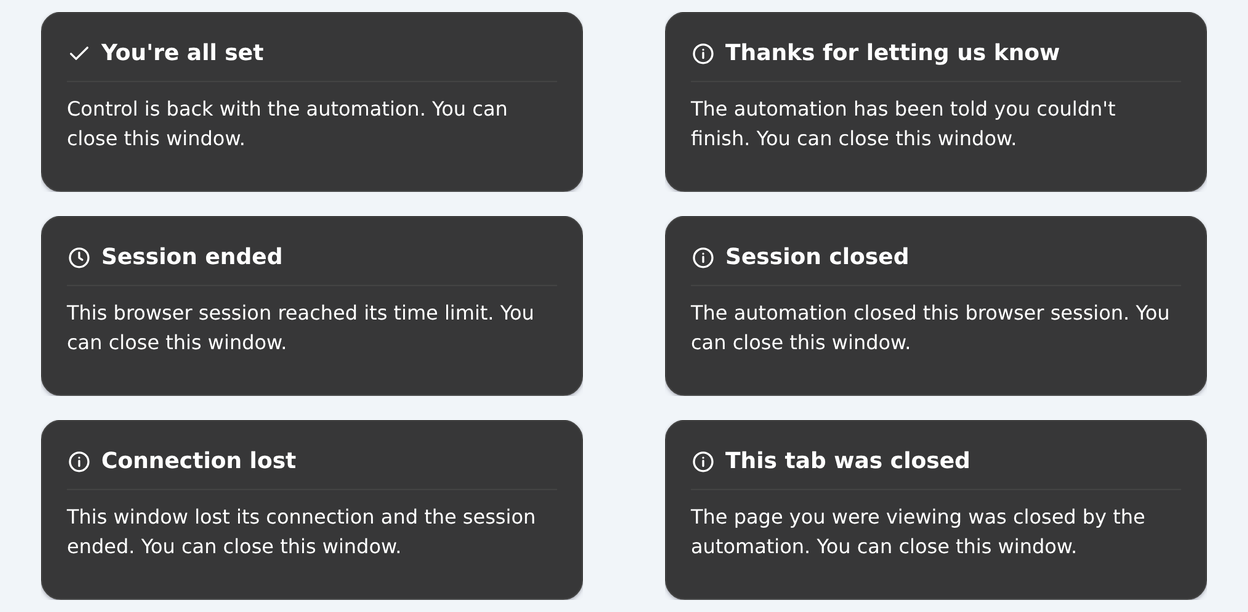
Ending screens distinguish success, failure, expiry, closure, disconnection and a closed target tab. Their wording describes the viewer's ending; your automation must still verify the task and manage the browser lifetime.
How it works
Create a liveURL through CDP and Browserless returns a short-lived link that opens in a browser tab, with no API token embedded. You can also embed the Live URL in your app. For multi-stage workflows, read-only monitoring, and bandwidth optimization, see advanced hybrid automation patterns.
| Behavior | Default | Override |
|---|---|---|
| Viewport | Resizes to match the end user's screen | resizable: false to keep the current viewport |
| Interaction | Click, type, scroll, touch, and tap enabled | interactable: false to block all input (view-only mode) |
| Stream quality | Compressed JPEG frames at quality 70 | quality: 1-100 (lower values use less bandwidth, useful on mobile), type: 'png' for lossless frames that use more bandwidth |
| Instructions | Hidden, with no completion buttons | Non-empty instructions: '...' shows them in a modal, with Done and Couldn't do it buttons on interactable links. Pass instructions: { summary: '...', layout: 'panel' } to show them in a side panel instead, where the second button reads Couldn't finish |
| Tab scope | Without targetId, starts on the sending page and follows new tabs and popups (mode: "follow"). With targetId, stays on that tab (mode: "tab"). An explicit mode overrides the default. | Select a tab with targetId; see CDP parameters and multi-tab workflows. showBrowserInterface: true shows browser chrome; use mode to choose tab behavior. |
| Events | None | Listen for Browserless.liveComplete and Browserless.captchaFound |
Basic implementation
The examples below show a short login handoff. For a bounded wait, explicit handling of every completion reason and a reusable multi-stage helper, use End-to-end handoff.
- Puppeteer
- Playwright
import puppeteer from 'puppeteer-core';

const browser = await puppeteer.connect({
  browserWSEndpoint: 'wss://production-sfo.browserless.io?token=YOUR_API_TOKEN_HERE',
});
const page = await browser.newPage();
await page.goto('https://practicetestautomation.com/practice-test-login/');

const cdp = await page.createCDPSession();
// Close the browser on every exit, including a failed handoff.
try {
  const { liveURL, error } = await cdp.send('Browserless.liveURL', {
    // Give the person enough time to finish; the default is 30 seconds.
    timeout: 120000,
    instructions: 'Use the practice credentials shown on the page, then choose Done.',
  });
  if (error) throw new Error(error);

  // Arm the listener before sharing, since earlier events are not replayed.
  const completion = new Promise((r) => cdp.once('Browserless.liveComplete', r));
  // Local testing only. In production, send the link to the person privately instead of logging it.
  console.log('Share this URL:', liveURL);

  // userDone comes from Done; userFailed comes from submitting the Couldn't do it feedback form.
  const { reason } = await completion;
  if (reason !== 'userDone') throw new Error(`Handoff ended without Done: ${reason}`);

  // Anyone with the link can choose Done, so check the page before continuing.
  await page.waitForSelector('h1.post-title', { timeout: 5000 });
  const title = await page.$eval('h1.post-title', (el) => el.textContent.trim());
  if (title !== 'Logged In Successfully') throw new Error('Login not verified');

  // Continue automation...
} finally {
  await browser.close();
}
import { chromium } from 'playwright-core';

const browser = await chromium.connectOverCDP(
  'wss://production-sfo.browserless.io?token=YOUR_API_TOKEN_HERE'
);
const [context] = await browser.contexts();
const page = await context.newPage();
await page.goto('https://practicetestautomation.com/practice-test-login/');

const cdpSession = await context.newCDPSession(page);
// Close the browser on every exit, including a failed handoff.
try {
  const { liveURL, error } = await cdpSession.send('Browserless.liveURL', {
    // Give the person enough time to finish; the default is 30 seconds.
    timeout: 120000,
    instructions: 'Use the practice credentials shown on the page, then choose Done.',
  });
  if (error) throw new Error(error);

  // Arm the listener before sharing, since earlier events are not replayed.
  const completion = new Promise((r) => cdpSession.once('Browserless.liveComplete', r));
  // Local testing only. In production, send the link to the person privately instead of logging it.
  console.log('Share this URL:', liveURL);

  // userDone comes from Done; userFailed comes from submitting the Couldn't do it feedback form.
  const { reason } = await completion;
  if (reason !== 'userDone') throw new Error(`Handoff ended without Done: ${reason}`);

  // Anyone with the link can choose Done, so check the page before continuing.
  await page.waitForSelector('h1.post-title', { timeout: 5000 });
  const title = (await page.textContent('h1.post-title'))?.trim();
  if (title !== 'Logged In Successfully') throw new Error('Login not verified');

  // Continue automation...
} finally {
  await browser.close();
}
End-to-end handoff
Install puppeteer-core, save the helper and the script below together in handoff.mjs, and replace YOUR_API_TOKEN_HERE with your API token. This example uses public practice credentials displayed on the target page, not a real account. It keeps the automation connected while the person works and always closes the browser.
The 180-second session and 120-second link need a paid plan. Free sessions last at most 2 minutes, and a value above your plan's maximum session duration returns an error. On Free, connect with timeout=120000 and pass timeout: 90000 in the handoff options.
Copy this helper into your script once. Use one outstanding handoff per page-level CDP session; await it before minting the next stage. share delivers the link privately. Keep the browser connected and close it in your script's finally block, including when delivery or the wait fails.
async function handoff(cdp, options, share) {
  const live = await cdp.send('Browserless.liveURL', {
    timeout: 120000,
    ...options,
  });
  if (live.error) throw new Error(live.error);

  let listener;
  let timer;
  try {
    return await new Promise((resolve, reject) => {
      // Arm after minting: replacement can complete the previous mint.
      listener = resolve;
      // Use on/off: Puppeteer's once wrapper cannot be removed by this callback.
      cdp.on('Browserless.liveComplete', listener);
      // Bound the application wait even if the transport disappears.
      timer = setTimeout(() => reject(new Error('No liveComplete received')),
        (live.timeout ?? options.timeout ?? 120000) + 5000);
      Promise.resolve().then(() => share(live.liveURL)).catch(reject);
    });
  } finally {
    clearTimeout(timer);
    cdp.off('Browserless.liveComplete', listener);
  }
}
import puppeteer from 'puppeteer-core';

const browser = await puppeteer.connect({
  // Keep the session open longer than the 120-second link.
  browserWSEndpoint: 'wss://production-sfo.browserless.io?token=YOUR_API_TOKEN_HERE&timeout=180000',
});
try {
  const page = await browser.newPage();
  await page.goto('https://practicetestautomation.com/practice-test-login/');
  const cdp = await page.createCDPSession();
  cdp.once('Browserless.liveViewerConnected', () => {
    console.log('The person opened the link; waiting for their result.');
  });
  const { reason } = await handoff(cdp, {
    instructions: 'Use the practice credentials shown on this page, then choose Done.',
  }, (url) => {
    // Local demonstration only. Replace with private delivery in your app.
    console.log('Open this link:', url);
  });

  switch (reason) {
    case 'userDone':
      break; // Verify the claim below before continuing.
    case 'userFailed':
      throw new Error('The person could not finish; offer help before retrying.');
    case 'timeout':
      throw new Error('The link expired; offer a new handoff if still needed.');
    case 'closed':
      throw new Error('The handoff was closed or replaced; stop this stage.');
    case 'viewerDisconnected':
      throw new Error('The viewer left; check with them before retrying.');
    default:
      throw new Error(`Unexpected completion: ${reason}`);
  }
  await page.waitForSelector('h1.post-title', { timeout: 5000 });
  const title = await page.$eval('h1.post-title', (el) => el.textContent.trim());
  if (title !== 'Logged In Successfully') throw new Error('Login not verified');
  console.log('Login verified; continuing automation.');
  // Perform the next authorized action here.
} finally {
  await browser.close();
}
Response
Open this link: https://production-sfo.browserless.io/e/53b1.../live/index.html?i=a1b2c3d4...&t=...
The person opened the link; waiting for their result.
Login verified; continuing automation.
An opened link isn't a completed task. Browserless.liveViewerConnected is useful for a “person connected” indicator; use the event reference for its payload. Retry deliberately with a new mint after resolving the problem, rather than looping indefinitely or treating disconnect as success.
Close a Live URL programmatically
This script waits for Live URL completion or a specific selector on the page. When the selector appears, it programmatically closes the Live URL. Completion alone does not prove the user finished the task.
- Puppeteer
- Playwright
import puppeteer from "puppeteer-core";

const browser = await puppeteer.connect({
  browserWSEndpoint: `wss://production-sfo.browserless.io?token=YOUR_API_TOKEN_HERE`,
});
const page = await browser.newPage();
await page.goto("https://practicetestautomation.com/practice-test-login/");

const cdp = await page.createCDPSession();
const { liveURL, liveURLId } = await cdp.send("Browserless.liveURL", {
  timeout: 120000,
});

console.log("Share this URL:", liveURL);

// Wait for live URL completion OR a successful login
const result = await Promise.race([
  new Promise((r) =>
    cdp.once("Browserless.liveComplete", () => r("live_completed"))
  ),
  page.waitForSelector("h1.post-title", { timeout: 0 })
    .then(() => "login_detected"),
]);

if (result === "login_detected") {
  await cdp.send("Browserless.closeLiveURL", { liveURLId });
}

console.log(`LiveURL closed via: ${result}`);
await browser.close();
import { chromium } from "playwright-core";

const browser = await chromium.connectOverCDP(
  `wss://production-sfo.browserless.io?token=YOUR_API_TOKEN_HERE`
);
const [context] = browser.contexts();
const page = await context.newPage();
await page.goto("https://practicetestautomation.com/practice-test-login/");

const cdpSession = await context.newCDPSession(page);
const { liveURL, liveURLId } = await cdpSession.send("Browserless.liveURL", {
  timeout: 120000,
});

console.log("Share this URL:", liveURL);

// Wait for live URL completion OR a successful login
const result = await Promise.race([
  new Promise((r) =>
    cdpSession.once("Browserless.liveComplete", () => r("live_completed"))
  ),
  page.waitForSelector("h1.post-title", { timeout: 0 })
    .then(() => "login_detected"),
]);

if (result === "login_detected") {
  await cdpSession.send("Browserless.closeLiveURL", { liveURLId });
}

console.log(`LiveURL closed via: ${result}`);
await browser.close();
Handle completion reasons
Browserless.liveComplete supplies { liveURLId, reason, feedback? }. Only userFailed can include optional feedback with category and/or message. The example below uses the page's cdp session from the Puppeteer example above (use cdpSession for Playwright). It logs only the category, never the message, which may contain sensitive information. Feedback is untrusted bearer-holder input: never render it as HTML or feed it to an LLM as instructions.
Arm the listener after the mint response and before sharing the link. Re-minting on the same page reuses the ID and completes the old mint with closed. A listener armed earlier can receive that old completion instead.
const { liveURL, error } = await cdp.send('Browserless.liveURL', {
  timeout: 60000,
  interactable: true,
  instructions: 'Sign in, then choose Done.',
});
if (error) throw new Error(error);
const completion = new Promise((resolve) =>
  cdp.once('Browserless.liveComplete', resolve)
);
console.log('Share this link:', liveURL);
const { reason, feedback } = await completion;

switch (reason) {
  case 'timeout':
    console.log('The link expired; retry the handoff if needed.');
    break;
  case 'closed':
    console.log('The link was closed or replaced; check the page state.');
    break;
  case 'viewerDisconnected':
    console.log('The viewer left; verify the task before continuing.');
    break;
  case 'userDone':
    console.log('The viewer reported done; verify the result.');
    break;
  case 'userFailed':
    console.log(`The viewer reported a problem${feedback?.category ? ` (${feedback.category})` : ''}; handle it before continuing.`);
    break;
}
userDone and userFailed are the person's own verdict. Done completes the handoff immediately; Couldn't do it opens a feedback form, then Send and end session completes it with userFailed. Either completion closes the link and leaves the browser session running, so your script can carry on. Completion fires at most once per mint, not once per viewer. viewerDisconnected fires only after the last viewer stays gone for two seconds; an ordinary viewer reconnect within that grace cancels it. The URL remains reopenable until expiry while the browser session is available, but reopening does not re-arm completion. Credential-protection teardown blocks new viewers for the session, so reopening cannot cancel or re-arm that completion. Verify the expected page state rather than treating disconnect as success. See the full reason and feedback contract for categories, the trimmed 500-character message limit, and BQL / REST feedback availability.
Tell the person what to do
By default, Live URLs show no Instructions modal, collapsed pill, or completion buttons. Pass non-empty instructions or steps to show a card. Plain and rich cards render in both modal and panel layouts. On interactive links, the person reads it, does the task, then chooses Done or opens feedback with Couldn't do it (modal), Couldn't finish (panel), or your custom failure label. Read-only links show the modal card without buttons; panel mode shows no card. No non-empty text or steps hides the card without changing interactable.
Before: plain instructions
const { liveURL, liveURLId, error } = await cdp.send('Browserless.liveURL', {
  timeout: 300000,
  instructions: '1. Log in with your work account.\n2. Approve the 2FA prompt.\n3. Choose Done.',
});
if (error) throw new Error(error);
| Rule | Behavior |
|---|---|
| Type | CDP and BQL accept a legacy string or structured instructions object. REST accepts strings only and rejects objects. |
| Length | Trimmed, then truncated to 2,048 characters. |
| Line breaks | Preserved, so \n puts each step on its own line. |
| Omitted or blank text | Without non-empty steps, no Instructions modal, collapsed pill, or completion buttons. Page interactivity is unchanged. |
| View-only links | With interactable: false, non-empty text or steps shows the modal without completion buttons. The panel layout shows nothing. |
The same instructions parameter is accepted by BQL (liveURL(instructions: "Sign in, then choose Done.")) and the REST POST /browser/{id}/live JSON body.
Without instructions, detect the expected page state and call cdp.send('Browserless.closeLiveURL', { liveURLId }), or let the link time out. Completion still reports closed / timeout; last-viewer disconnect can also report viewerDisconnected. See Close a Live URL programmatically for a complete example.
After: a structured instructions card
Mint a card through CDP or BQL using an instructions object. Optional strings are trimmed; empty strings are absent. Title, button labels, or requester alone cannot create a card: include non-empty summary or steps. Previous flat rich-card names remain compatibility options, but new examples use the object. doneLabel, failLabel, and requesterName remain outer arguments. See the CDP parameter table and validation errors for all limits.
const card = {
  instructions: {
    layout: 'modal',
    format: 'markdown',
    title: 'Sign in to continue',
    summary: 'Use your **work account**. Keep this window open until you see the `Dashboard` page.',
    steps: ['Enter your work email.', 'Approve the *2FA prompt*.', 'Return to this window.'],
    currentStep: 1,
  },
  doneLabel: 'Signed in',
  failLabel: 'Need help',
  requesterName: 'Support team',
};
const { liveURL, liveURLId, error } = await cdp.send('Browserless.liveURL', {
  timeout: 120000,
  ...card,
});
if (error) throw new Error(error);
// Share liveURL privately with the person.
instructions.format defaults to text. The markdown subset supports bold (** or __), italic (* or _), inline backticks, and [label](http(s)://url) links, including combined emphasis such as **_bold italic_**. Text inside code spans and HTML remain literal; underscores within words such as snake_case stay unchanged. Only summary and steps are formatted; title, labels, and requester always remain plain text.
Checkbox ticks are local to the viewer, not server-side progress or proof of success. currentStep is a 1-based integer requiring steps and seeds earlier items as checked and disabled. The current and later steps remain editable. The first unchecked step is highlighted; when all are checked there is no current highlight, and checking all steps does not auto-complete the handoff. Updates with the same normalized steps and unchanged server currentStep preserve local ticks. Changing server currentStep resets ticks to the supplied progress; changing the steps resets them. Choosing a custom button label does not change the completion reason or verify the task.
Replace the card while the link is open
Browserless.setLiveURLInstructions replaces the whole card, not just the supplied fields. Connected viewers see the replacement immediately. To advance the active step, resend the complete content you want to keep:
await page.waitForSelector('#otp');
const update = await cdp.send('Browserless.setLiveURLInstructions', {
  liveURLId,
  ...card,
  instructions: { ...card.instructions, currentStep: 2 },
});
if (update.error) throw new Error(update.error);
Response:
{ "error": null, "liveURLId": "..." }
Only liveURLId is required. Omitted card fields are cleared (including formatting, which returns to text). Existing { liveURLId, instructions } calls still work. To hide the entire card and completion buttons, send only { liveURLId }, or blank text with no steps or non-empty metadata.
Layout is preserved when omitted from an update; supplying instructions.layout can switch it. Desktop panel replacements stay open; clearing the card removes the panel and releases its reserved space, and a later non-empty replacement restores it. On narrow viewers, a replacement resets the panel to its collapsed summary unless the failure-feedback form is open. Card replacements and clearing preserve that form and its draft; Go back dismisses and clears the draft. Both layouts follow the same steps and server-progress rules for local ticks.
Keep instructions beside the page
The default modal covers part of the streamed page, so the person has to dismiss it to see what they're working on. Set instructions.layout: 'panel' to put the instructions in a 340px column to the right of the stream instead. The steps stay readable while the person works through them. Change layout in the structured-card example above to render the same title, formatting, checklist and custom labels beside the page. Legacy string callers can still use outer instructionsLayout: 'panel'; object layout overrides it.
const { liveURL, liveURLId, error } = await cdp.send('Browserless.liveURL', {
  instructions: {
    layout: 'panel',
    summary: '1. Sign in.\n2. Enter your verification code.\n3. Choose Done.',
  },
  interactable: true,
  showBrowserInterface: true,
  timeout: 120000,
});
if (error) throw new Error(error);
In BQL, object fields use the StringOrInstructions scalar, so quote layout. The legacy outer instructionsLayout remains an enum for string callers:
mutation {
  goto(url: "https://example.com/login") { status }
  liveURL(
    instructions: {
      layout: "panel"
      summary: "Sign in, enter your verification code, then choose Done."
    }
    interactable: true
    timeout: 120000
  ) {
    liveURL
    liveURLId
  }
}
| Rule | Behavior |
|---|---|
| Requirements | Non-empty text or steps and interactable: true. A read-only panel link shows no instructions at all, so use the default modal if you need read-only instructions. |
| Desktop | The panel stays open while a card is set and has no hide control. Long content scrolls inside it; completion buttons stay pinned at the bottom. Default labels are Done and Couldn't finish, unless overridden. |
| Narrow viewers | At 900px wide or less, the panel becomes a collapsible section. The person can hide it and still reach Done. Widening the viewer restores the full panel. |
| Viewport | With resizable: true, the remote viewport resizes to fit the space left beside the panel. With resizable: false, the stream scales into that space and the remote viewport keeps its size. |
| Browser chrome | Works with showBrowserInterface on or off. |
| Updates | Browserless.setLiveURLInstructions replaces the entire card in both layouts, preserving layout if omitted and switching it when supplied. Clearing text and steps removes the panel and completion buttons without changing page interactivity. |
| Valid values | modal and panel only. Invalid layouts are rejected; the legacy outer BQL argument rejects unknown enum values. |
| Availability | CDP and BQL. REST POST /browser/{id}/live ignores instructionsLayout without returning an error, so REST links always use the modal. |
Mint through BQL
BQL accepts a legacy string or the same instructions object through the custom scalar StringOrInstructions, following the StringOrArray pattern. Use a GraphQL block string for a multiline summary:
mutation {
  liveURL(
    instructions: {
      layout: "modal"
      format: "markdown"
      title: "Sign in to continue"
      summary: """
        Use your **work account**.
        Read the [sign-in guide](https://example.com/sign-in) if needed.
        Continue until you see the `Dashboard` page.
      """
      steps: ["Enter your work email.", "Approve the *2FA prompt*."]
      currentStep: 1
    }
    doneLabel: "Signed in"
    failLabel: "Need help"
    requesterName: "Support team"
  ) {
    liveURL
  }
}
Existing variable declarations such as $instructions: String must migrate to $instructions: StringOrInstructions, even when the variable value is still a string. Inline string literals continue to work unchanged:
mutation Handoff($instructions: StringOrInstructions) {
  liveURL(instructions: $instructions) { liveURL liveURLId }
}
Pass either a string or the object as the JSON variable value; do not stringify the object. Structured cards are available for CDP/BQL minting and CDP updates only. REST continues to support string instructions but explicitly rejects objects and rich-card options; see Manage Live URLs over REST.
Mint a Live URL for a running browser over HTTP
You can use this browser-management route to create a view-only Live URL for a browser you own:
curl -X POST \
  "https://production-sfo.browserless.io/browser/BROWSER_ID/live?token=YOUR_API_TOKEN_HERE"
{
  "liveURL": "https://production-sfo.browserless.io/e/.../live/index.html?i=...&t=...&showBrowserInterface=true",
  "liveURLId": "..."
}
The route selects the focused page, shows the browser interface, and sets interactable: false. The URL lasts for up to 15 minutes, capped by the browser session's remaining lifetime. It returns 404 when the browser doesn't exist or is not accessible. See the POST /browser/{id}/live reference.
End-user authentication
Live URL links authenticate using a short-lived ?i=<id> parameter that is unique to the session. This ID expires automatically after the Live URL timeout elapses or when Browserless.closeLiveURL is called. Live URL paths do not require your API token. Do not embed your token in Live URL links shared with end users.
With interactable: true, anyone holding the link controls the browser session, including any logged-in state inside it. They can also choose Done and move your script forward. Send the link over a trusted private channel, keep it out of logs and tickets, and always verify the page state after completion instead of trusting the reason alone. The examples on this page print the link with console.log for local testing. In production, deliver it to the person directly.
After Browserless fills a stored credential, it immediately closes active Live URL streams and refuses new viewers or new Live URLs for that session. See the 1Password security model.
Network endpoints & VPN/proxy tips
The Live URL page loads over HTTPS and then upgrades a same-origin WebSocket to stream frames and input. When diagnosing corporate firewalls, VPNs, or upstream proxies, both of the URLs below must be reachable from the end user's browser:
| Surface | URL pattern | Protocol |
|---|---|---|
| Live URL page | https://<your-browserless-host>/live/index.html?i=<id> | HTTPS |
| Live URL stream | wss://<your-browserless-host>/live/<id> | WebSocket (WSS, TLS) |
For the Browserless-managed fleet, <your-browserless-host> resolves to production-sfo.browserless.io, production-lon.browserless.io, or production-ams.browserless.io depending on the region you connected to. Self-hosted Enterprise deployments use the same /live/* paths on whatever host they are deployed to.
If end users report an intermittent Couldn't establish a secure connection to the server. error on the Live URL page:
- Allowlist WebSockets to
/live/*, not just HTTPS. Some VPNs and TLS-inspecting proxies pass HTTPS traffic but terminate WebSocket upgrades, which produces exactly this error. - Some VPN exit nodes interfere with specific regions. Switching VPN node/region – or routing Live URL traffic directly – usually resolves it when the failure is tied to a particular upstream proxy.
- The server sends WebSocket pings every 30s to keep the connection alive through idle-timeout-sensitive middleboxes. After an initial connection failure or an established stream drops, the Live URL page shows Reconnecting… and retries three times after 1, 2, and 4 seconds before showing a terminal error.
- Prefer a stable region close to the end user (
production-sfo,production-lon,production-ams) for the underlying Browserless connection. The Live URL WSS runs on the same host, so a closer region reduces the number of hops where VPN/proxy interference can occur.
FAQ & troubleshooting
How do I enable liveURL for my account or token?
There's nothing to enable. Call the liveURL BQL mutation or the Browserless.liveURL CDP command shown above.
Can a human interact with the session without writing code?
Yes, that's what the live URL is for. Request it with interactable: true and share the link; anyone who opens it can watch the browser and click, type, and scroll in it directly, with no code or Browserless account needed. Useful for hand-completing logins or reviewing what an automation is doing.
Why does my session end right after I mint a Live URL?
The Live URL timeout sets how long the link stays valid. It doesn't keep the browser alive. If your client disconnects, for example because a one-shot BrowserQL request finished, the browser closes and the link stops working. Request reconnect with a timeout long enough for the person to finish, or keep your own connection open while they work. The applied link lifetime comes back in the timeout field, and it's capped at the session's remaining time.
Why was a viewer rejected with 429?
Each Live URL accepts five concurrent viewers. Close an existing viewer before connecting another one. Reloads and reconnects can briefly overlap, so wait for the old connection to close before retrying.
Why didn't Browserless.liveComplete fire?
Register the listener on the same CDP session before sharing the URL; earlier events are not replayed. The event fires at most once for a CDP-created link: on timeout, Browserless.closeLiveURL, replacement by another live URL on the same page, the viewer choosing Done or submitting feedback with Send and end session, or about two seconds after the last viewer disconnects (including credential-protection teardown). A reconnect within that grace period cancels the pending viewer-disconnect completion. Links nobody opens still complete on timeout, close, or replacement. Completion does not prove the human task succeeded; verify the expected page state before continuing.
Why am I getting a 403 Forbidden error?
Your API token is missing or expired. Pass it as a ?token= query parameter in the WebSocket or HTTP URL. Verify the token in your account dashboard.
My script works locally but fails on Browserless
Local browser settings may differ from the Browserless environment. Use launch parameters to match your local setup (viewport, user agent, timezone). See launch parameters for the full list.