Quickstart
Connect to Browserless using either Puppeteer or Playwright through Chrome's DevTools Protocol (CDP) using websockets. This is the primary and recommended way to connect to Browserless, as it provides a stable and reliable connection.
- A Browserless API token from your account dashboard
- Puppeteer or Playwright installed locally
Follow these steps to get started with Browserless:
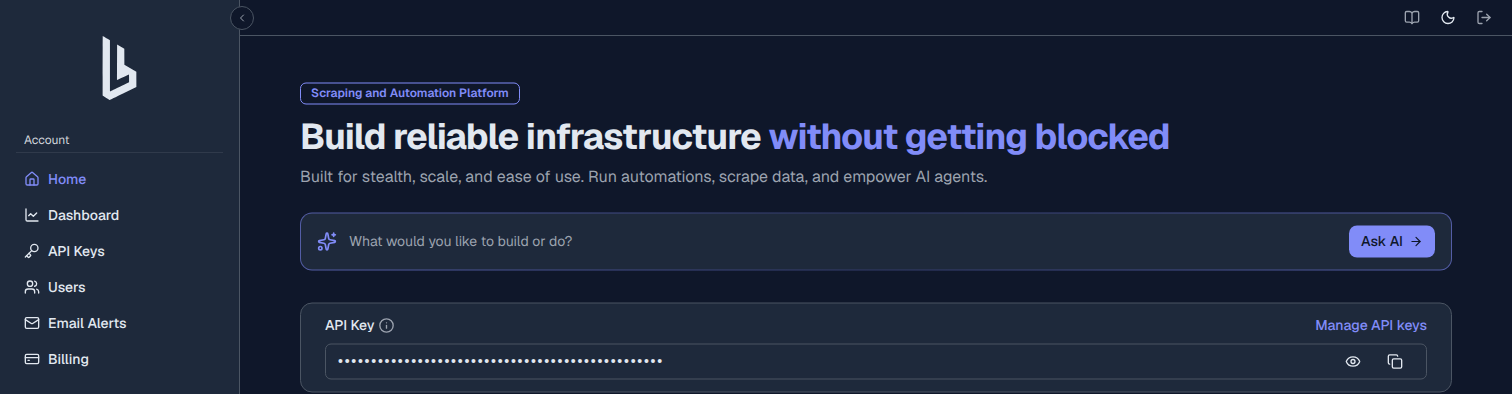
Get Your API Token
- Go to the Browserless dashboard
- Sign up or log in to your account
- Copy your API token from the dashboard
Install Library
Choose your preferred automation library and install it:
- Puppeteer
- Playwright
npm install puppeteer-core- JavaScript
- Python
- Java
- C#
- Go
npm install playwright-corepip install playwright<dependency>
<groupId>com.microsoft.playwright</groupId>
<artifactId>playwright</artifactId>
<version>1.40.0</version>
</dependency>dotnet add package Microsoft.Playwrightgo get github.com/playwright-community/playwright-goYou also need to install the Playwright browser binaries once:
go run github.com/playwright-community/playwright-go/cmd/playwright@latest install --with-depsRun Your First Example
Here's a complete working example:
- Puppeteer
- Playwright
import puppeteer from "puppeteer-core";

const TOKEN = "YOUR_API_TOKEN_HERE"; // Replace with your actual token

async function getPageTitle() {
  // Connect to Browserless using WebSocket endpoint
  const browser = await puppeteer.connect({
    browserWSEndpoint: `wss://production-sfo.browserless.io?token=${TOKEN}`,
  });

  const page = await browser.newPage();

  // Navigate to the target website
  await page.goto("https://www.example.com/");

  // Get the page title
  const title = await page.title();
  console.log(`The page's title is: ${title}`);

  // Clean up resources
  await browser.close();
}

getPageTitle().catch(console.error);
Output
The page's title is: Example Domain- JavaScript
- Python
- Java
- C#
- Go
import { chromium } from "playwright-core";

const TOKEN = "YOUR_API_TOKEN_HERE"; // Replace with your actual token

async function getPageTitle() {
  // Connect to Browserless using CDP (recommended method)
  const browser = await chromium.connectOverCDP(
    `wss://production-sfo.browserless.io?token=${TOKEN}`
  );

  const context = await browser.newContext();
  const page = await context.newPage();

  // Navigate to the target website
  await page.goto("https://www.example.com/");

  // Get the page title
  const title = await page.title();
  console.log(`The page's title is: ${title}`);

  // Clean up resources
  await browser.close();
}

getPageTitle().catch(console.error);
Output
The page's title is: Example Domainfrom playwright.sync_api import sync_playwright
TOKEN = "YOUR_API_TOKEN_HERE" # Replace with your actual token
def get_page_title():
with sync_playwright() as p:
# Connect to Browserless using CDP (recommended method)
browser = p.chromium.connect_over_cdp(
f"wss://production-sfo.browserless.io?token={TOKEN}"
)
context = browser.new_context()
page = context.new_page()
# Navigate to the target website
page.goto("https://www.example.com/")
# Get the page title
title = page.title()
print(f"The page's title is: {title}")
# Clean up resources
browser.close()
if __name__ == "__main__":
get_page_title()Output
The page's title is: Example Domainpackage org.example;
import com.microsoft.playwright.*;
public class Main {
public static void main(String[] args) {
try (Playwright playwright = Playwright.create()) {
final String TOKEN = "YOUR_API_TOKEN_HERE"; // Replace with your actual token
// Connect to Browserless using CDP (recommended method)
Browser browser = playwright.chromium().connectOverCDP(
String.format("wss://production-sfo.browserless.io?token=%s", TOKEN)
);
BrowserContext context = browser.newContext();
Page page = context.newPage();
// Navigate to the target website
page.navigate("https://www.example.com/");
// Get the page title
String title = page.title();
System.out.println("The page's title is: " + title);
// Clean up resources
browser.close();
}
}
}Output
The page's title is: Example Domainusing Microsoft.Playwright;
namespace PlaywrightExample
{
class Program
{
private const string TOKEN = "YOUR_API_TOKEN_HERE"; // Replace with your actual token
public static async Task Main(string[] args)
{
using var playwright = await Playwright.CreateAsync();
// Connect to Browserless using CDP (recommended method)
var browser = await playwright.Chromium.ConnectOverCDPAsync(
$"wss://production-sfo.browserless.io?token={TOKEN}"
);
var context = await browser.NewContextAsync();
var page = await context.NewPageAsync();
// Navigate to the target website
await page.GotoAsync("https://www.example.com/");
// Get the page title
var title = await page.TitleAsync();
Console.WriteLine($"The page's title is: {title}");
// Clean up resources
await browser.CloseAsync();
}
}
}Output
The page's title is: Example Domainpackage main
import (
"fmt"
"log"
"github.com/playwright-community/playwright-go"
)
const token = "YOUR_API_TOKEN_HERE" // Replace with your actual token.
func main() {
// Start Playwright without launching a local browser.
pw, err := playwright.Run()
if err != nil {
log.Fatalf("could not start playwright: %v", err)
}
defer pw.Stop()
// Connect to Browserless using CDP (recommended method).
browser, err := pw.Chromium.ConnectOverCDP(
fmt.Sprintf("wss://production-sfo.browserless.io?token=%s", token),
)
if err != nil {
log.Fatalf("could not connect to browserless: %v", err)
}
context, err := browser.NewContext()
if err != nil {
log.Fatalf("could not create context: %v", err)
}
page, err := context.NewPage()
if err != nil {
log.Fatalf("could not create page: %v", err)
}
// Navigate to the target website.
if _, err = page.Goto("https://www.example.com/"); err != nil {
log.Fatalf("could not navigate: %v", err)
}
// Get the page title.
title, err := page.Title()
if err != nil {
log.Fatalf("could not get title: %v", err)
}
fmt.Printf("The page's title is: %s\n", title)
// Clean up resources.
if err = browser.Close(); err != nil {
log.Fatalf("could not close browser: %v", err)
}
}Output
The page's title is: Example Domain
The examples above connect to the US West region (production-sfo). Browserless is also available in Europe. See Regional Endpoints to choose the region closest to your target sites.
FAQ & Troubleshooting
How do I connect Puppeteer to Browserless?
Replace your local browser launch with a WebSocket connection to Browserless. Use puppeteer.connect() with the Browserless WebSocket URL and your API token as a query parameter.
Does Browserless support Playwright?
Yes. Connect Playwright to Browserless using browserType.connect() with the Browserless WebSocket URL. Both Chromium and Firefox browsers are supported for Playwright connections.
Do I need to change my existing automation code?
Minimal changes are needed. Replace your browser launch call with a connect call pointing to Browserless. The rest of your Puppeteer or Playwright code runs unchanged against the remote browser.
Is there a free tier to try Browserless?
Yes. Sign up at browserless.io for a free account that includes a limited number of browser sessions per month. This lets you test your automation code against managed browsers before scaling up.